For hosts, glamping sites and managers already taking bookings
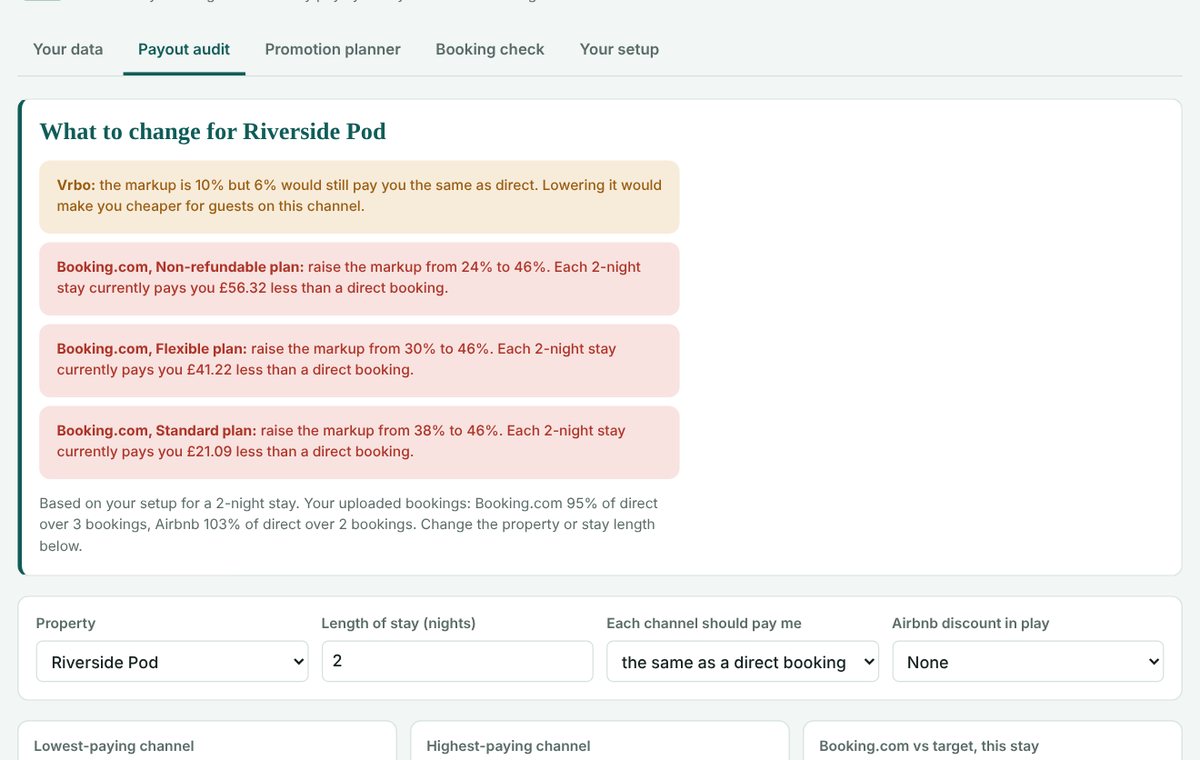
Upload your past bookings from any channel, or connect Hostaway, and Payout Check shows what you actually received from each booking once commission, payment fees, Genius and deals come off. It flags fees that don't add up and tells you which channel markups to change so every booking pays you properly.
One-off £19.95. No subscription, no renewal, no catches.
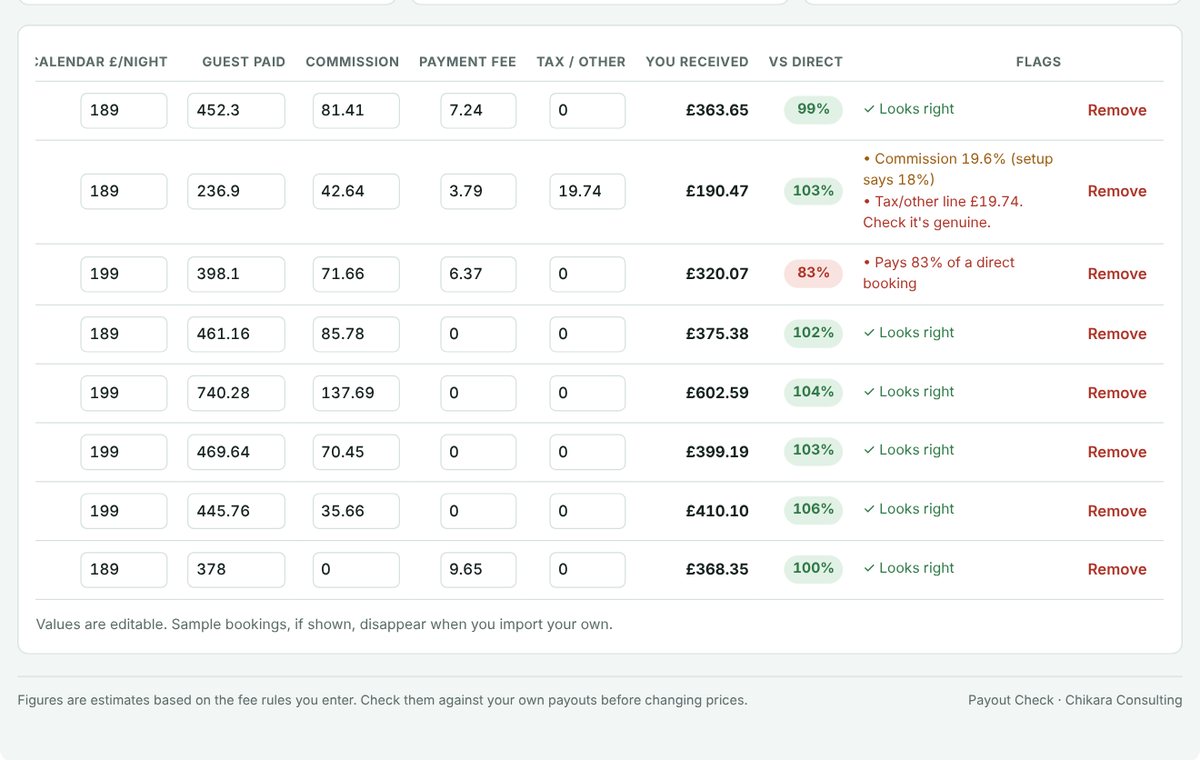
Commission or payment fees charged at a different rate from the one you expect, booking by booking.
City or tourism tax and other lines added to bookings that can make your prices look higher to guests.
Any channel, rate plan or Genius mix that leaves you short of what the same stay pays when booked direct, and the markup that fixes it.
One-off payment
£19.95one-off
You'll get your access code on screen and by email.
Payout Check is built so that your information stays with you.
To sell you access we hold only your email address and payment record, with the card payment handled by Stripe, plus anonymous codes that stop a pass being shared. We don't use these for anything else.
Yes. You pay £19.95 once. There's no subscription, nothing renews and your access doesn't run out.
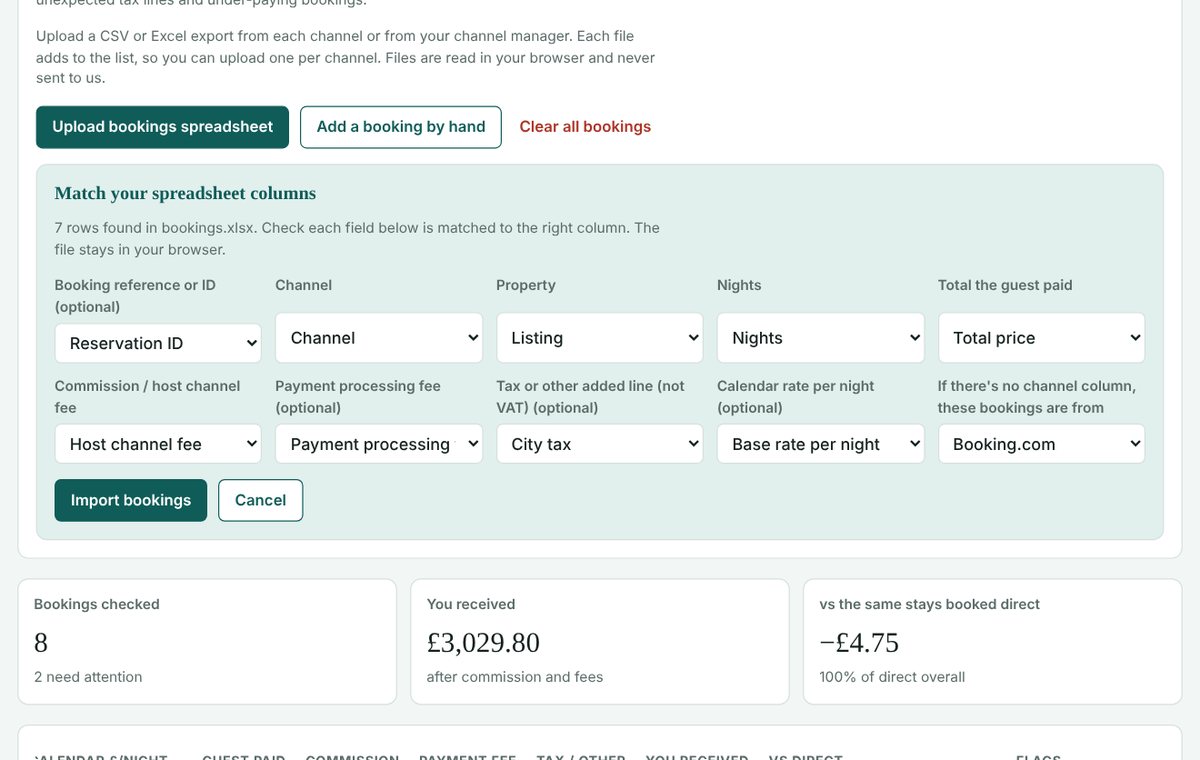
CSV or Excel (.xlsx) files. Most booking exports work, from the channels themselves or from a channel manager. You tell Payout Check which column holds the channel, total paid, commission and fees. The file is read in your browser and never uploaded to us. If a file only covers one channel, you can say which channel it's from.
No. Hostaway users can connect for a quick import, but uploading spreadsheets works for everyone.
None of your booking, pricing or business data. Spreadsheets are read and analysed in your browser and never sent to us, and results last only while your browser is open unless you choose to save them on your device. To provide your pass we keep your email address and payment record (card payments are handled by Stripe) and anonymous codes for the browsers your pass is used in and the Hostaway account it is linked to.
Yes. Each pass links to one Hostaway account, so agents managing several client accounts buy a pass for each. Spreadsheet uploads work for any property you manage.
Booking check uses the actual figures in your files, so it's as accurate as your exports. The markup advice uses the fees and discounts you enter, so check them against a recent payout from each channel.
For working out rates before you've taken bookings, use the STR Pricing Calculator. Payout Check is for checking bookings you've already had.
One-off £19.95. No subscription. No catches.
| Channel | Markup | Guest pays | Fees | You receive | vs target | Markup needed |
|---|
Genius discounts and any deals stack on every plan. The Blended column weights each Genius level by your guest mix (set in Your setup).
| Rate plan | Markup | No Genius | Genius 1 | Genius 2 | Genius 3 | Blended | Needed (blended) |
|---|
Share of your target each channel pays, for the stay length above. Booking.com is blended across your plan and Genius mix.
Model a discount on one channel. The planner works out what each night pays you before and after the promotion, how many extra nights it needs to break even, and what a month looks like.
| Discount | You receive / night | Extra empty nights needed | Uplift needed |
|---|
Assumes every extra night would otherwise sit empty, which is the best case for a promotion.
Each booking's actual commission, fees and payout, compared with what a direct booking at your calendar rate would have paid. The app flags fees that don't match your setup, unexpected tax lines and under-paying bookings.
Upload a CSV or Excel export from each channel or from your channel manager. Each file adds to the list, so you can upload one per channel. Files are read in your browser and never sent to us.
| Booking | Channel | Property | Nights | Calendar £/night | Guest paid | Commission | Payment fee | Tax / other | You received | vs direct | Flags |
|---|
Values are editable. Sample bookings, if shown, disappear when you import your own.
The calendar rate is your nightly base rate in the channel manager. Markups are the % your channel manager adds for each channel.
| Property | Calendar £/night | Airbnb % | Expedia % | Vrbo % | Website % |
|---|
Your Genius guest mix. Check Booking.com's Genius report, or estimate it.
Enter each plan's markup as Booking.com actually shows it. If a plan is set up in the extranet as, say, 10% off another plan, enter the resulting markup. Share is the rough % of bookings each plan gets.
| Plan | Markup % | Min nights | Share of bookings % |
|---|
Deals that stack on top of Genius, such as a mobile rate or a length-of-stay deal.
| Deal | % off | Applies from (nights) | On |
|---|
Access code . Keep it to use Payout Check on another device. It was also emailed to you.
Export your past bookings as a CSV or Excel file from each channel, or from your channel manager, and upload them in Booking check. Upload one file per channel if you need to. Each file adds to the list.
A read-only import of your listings, calendar rates, channel markups and bookings from the last 4 months and the next 12. Your API secret is used once and never stored. Each pass links to one Hostaway account.
The STR Pricing Calculator works out the markup each channel needs before you've taken bookings.
Your bookings and figures are worked out in this browser and never sent to us. By default they're cleared when you close the browser.